
QuickBooks Desktop
QuickBooks Crashes When Opening Company File? Fix It Fast

QuickBooks & Quicken support guides
If QuickBooks crashes when opening a company file, you’re not alone. This is one of the common issues users face with QuickBooks Desktop, and it can completely disrupt your workflow. The good news is that you can often identify the cause and fix it with a few troubleshooting steps.
In this guide, you’ll learn why QuickBooks crashes when opening a company file and step-by-step solutions to resolve it.
Why QuickBooks Crashes When Opening a Company File
This issue usually happens because of one or more of these problems:
- Corrupted or damaged company file (.QBW)
- Large file size or data overload
- Damaged QuickBooks installation
- Missing Windows components such as .NET Framework, MSXML, or C++
- Network issues when the file is stored on a server
- Conflicts with antivirus or background apps
In many cases, file corruption is the main culprit.
Quick Check: Is It the File or QuickBooks?
Do this first:
- Open QuickBooks while holding CTRL.
- Try opening a sample company file.
If the sample file opens, your company file may be damaged. If QuickBooks crashes again, the problem may be related to the software or system.
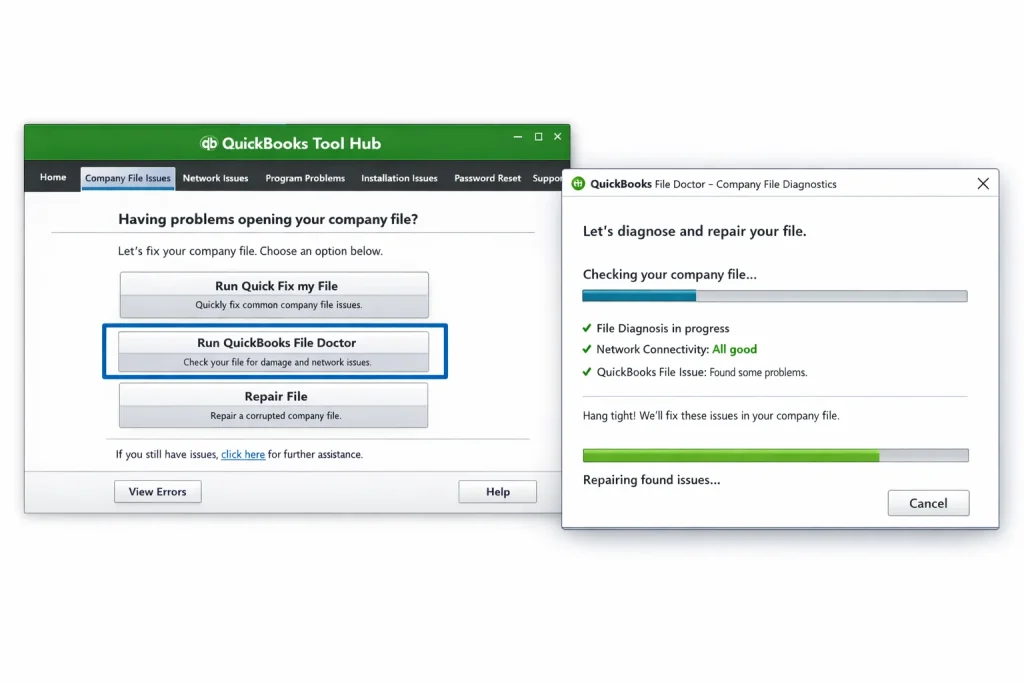
Solution 1: Use QuickBooks Tool Hub
QuickBooks Tool Hub can help diagnose company-file problems.
- Download and install QuickBooks Tool Hub.
- Open it and go to Company File Issues.
- Click Run QuickBooks File Doctor.
- Select your company file and scan it.
This can help with file corruption, network errors, and data damage.
Solution 2: Move the Company File to a Local Drive
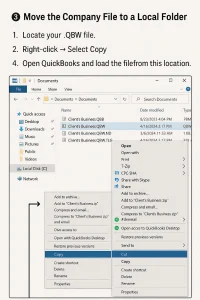
If your file is stored on a server or external drive:
- Copy the .QBW file to your Desktop or another local folder.
- Open QuickBooks.
- Try opening the file from the local system.
If it works locally, the problem may be related to the network or server connection.
Solution 3: Rename .ND and .TLG Files
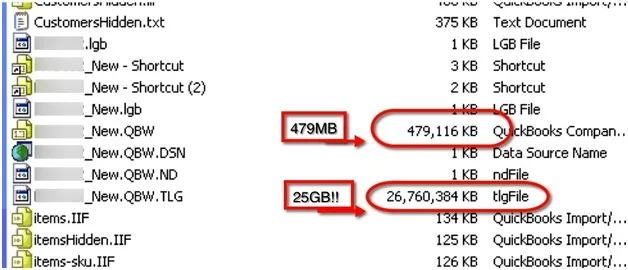
These configuration files can cause problems when they become damaged.
- Locate your company file folder.
- Find the files with the same name and the .ND and .TLG extensions.
- Rename them by adding .old at the end.
- Reopen QuickBooks.
For example: company.qbw.nd.old.
Solution 4: Repair QuickBooks Installation
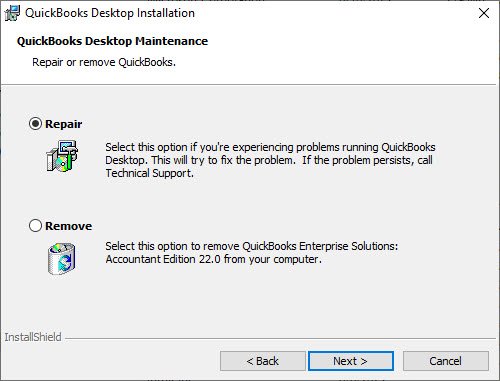
If QuickBooks itself is crashing, repair the installation through Windows.
- Go to Control Panel → Programs → Programs and Features.
- Select QuickBooks.
- Click Uninstall/Change.
- Choose Repair.
- Follow the on-screen instructions.
This can replace missing files and damaged program components.
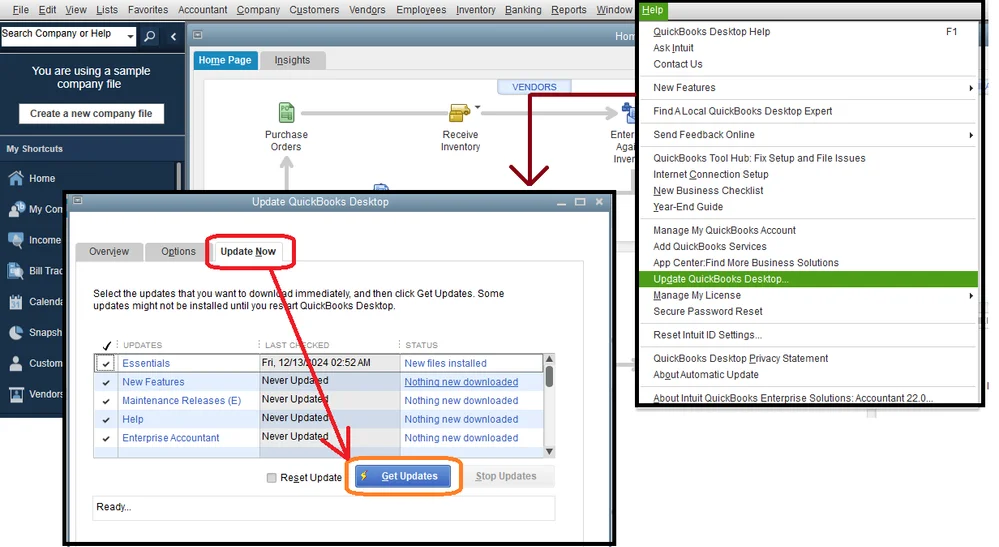
Solution 5: Update QuickBooks to the Latest Version
An outdated version can cause compatibility problems.
- Open QuickBooks.
- Go to Help → Update QuickBooks Desktop.
- Install available updates.
- Restart QuickBooks.
Solution 6: Suppress Desktop While Opening a File
This can help when a damaged window or report causes QuickBooks to crash during startup.
- Open QuickBooks.
- Select your company file.
- Hold the ALT key while clicking Open.
- Keep holding until the file opens.
Solution 7: Check Windows Components
If system components are damaged, QuickBooks may crash repeatedly.
- Open QuickBooks Tool Hub.
- Go to Installation Issues.
- Run the QuickBooks Install Diagnostic Tool.
This can repair components such as .NET Framework, MSXML, and Visual C++.
Still Crashing? Try These Advanced Fixes
- Restore a backup company file (.QBB).
- Create a new Windows user profile.
- Reinstall QuickBooks using a clean install.
- Temporarily disable antivirus software for testing.
Frequently Asked Questions
Why does QuickBooks crash only when opening a company file?
The file may be damaged, too large, or contain corrupted data that causes QuickBooks to fail while loading.
Can I recover a corrupted QuickBooks company file?
Yes. You can try QuickBooks File Doctor or restore a backup file.
Is it safe to rename .ND and .TLG files?
Yes. QuickBooks can recreate these files when needed.
Why does QuickBooks work fine with sample files but not mine?
This usually points to a problem with your company file rather than the QuickBooks installation.
Can an antivirus cause QuickBooks to crash?
Yes. Some antivirus programs can block QuickBooks processes or files.
How do I know if my company file is too large?
If QuickBooks becomes slow, freezes, or crashes frequently, the size or amount of data may be contributing to the problem.
Will reinstalling QuickBooks delete my company file?
No. Your company file is stored separately from the QuickBooks program.
What is the fastest way to fix this issue?
Starting with QuickBooks Tool Hub and File Doctor is a practical first step.
Why does QuickBooks crash in multi-user mode only?
This can point to a network configuration, hosting, firewall, or permissions problem.
How can I prevent this issue in the future?
- Back up your company file regularly.
- Keep QuickBooks updated.
- Avoid improper shutdowns.
- Use Verify and Rebuild Data when appropriate.
Final Thoughts
If QuickBooks crashes when opening a company file, the issue is usually linked to file damage, system errors, installation problems, or network issues. Start with the simple checks, then move to Tool Hub, file repair, or installation repair if needed.
Working through the fixes in order can help you identify the cause without jumping straight to a full reinstall.
About RyanFila
RyanFila is an experienced software support professional who has worked with different clients and helped them solve QuickBooks and Quicken problems. Through RyanFila, he shares free troubleshooting tips, practical guides, and useful information for accounting software users.